POI Tasking Workflow
This workflow explains how to place a point-based tasking order in V2.
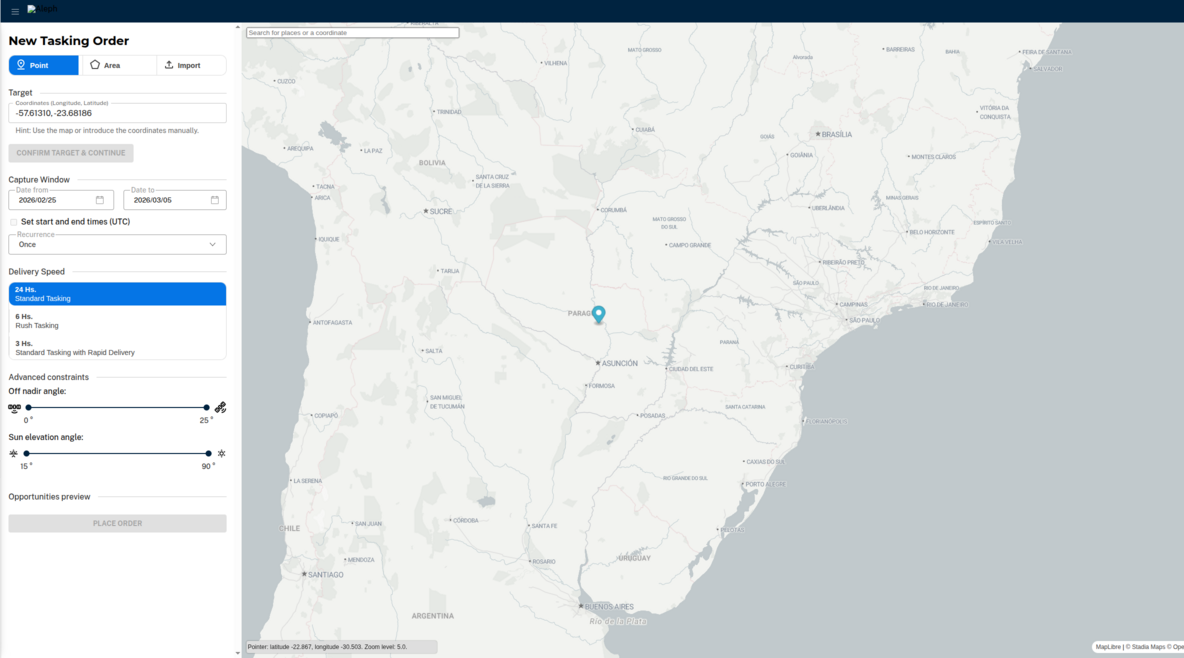
Workflow steps
- Open Create Order and select a POI tasking product.
- Define the point location and time window.
- Set product parameters (such as priority or processing levels, if available).
- Submit the order and track it in My Orders.
- Review capture and deliverable events in Order Details.
- Access completed deliverables in My Library.
API cross-links and SKUs
- Standard Tasking (POI) SKU: TSKPOI-M
- Rush Tasking SKU: TSKRSH-M.NN.NN
- Rush Tasking with Rapid Delivery SKU: TSKRRD-M.NN.NN
- Orders API overview
- Orders API specs
From V1 Tasking API? This is your direct equivalent. In V1, you'd call Analysis API (feasibility) then Tasking API (create task). In V2, use Orders API with a POI SKU. See Migration Decision Matrix for side-by-side code examples.